WhatsApp, SMS and email
Who can do this: Your customers
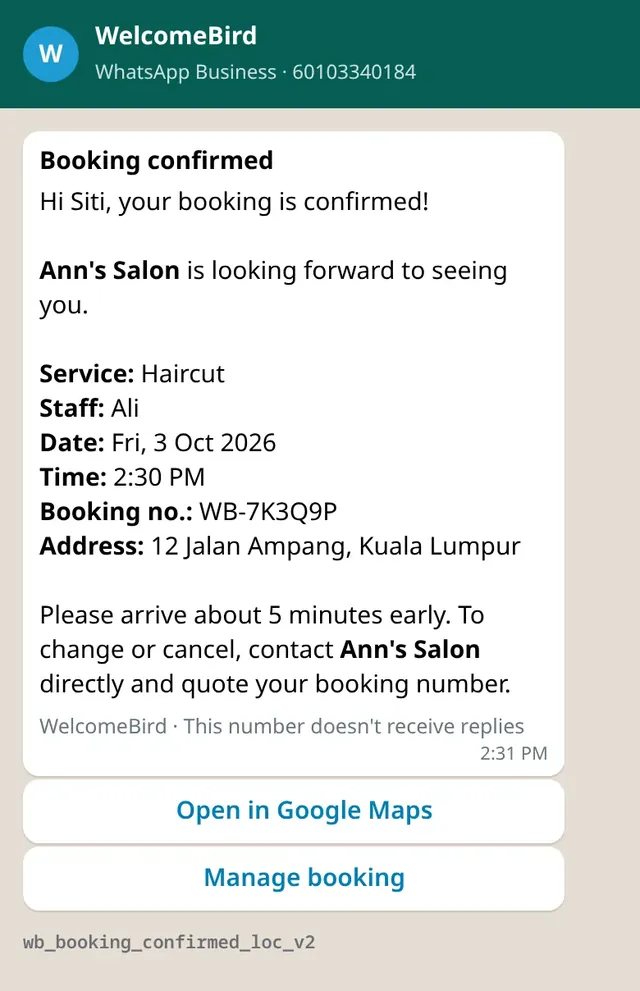
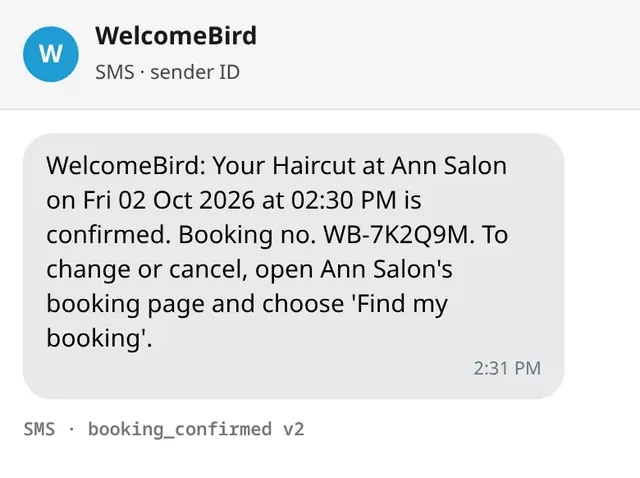
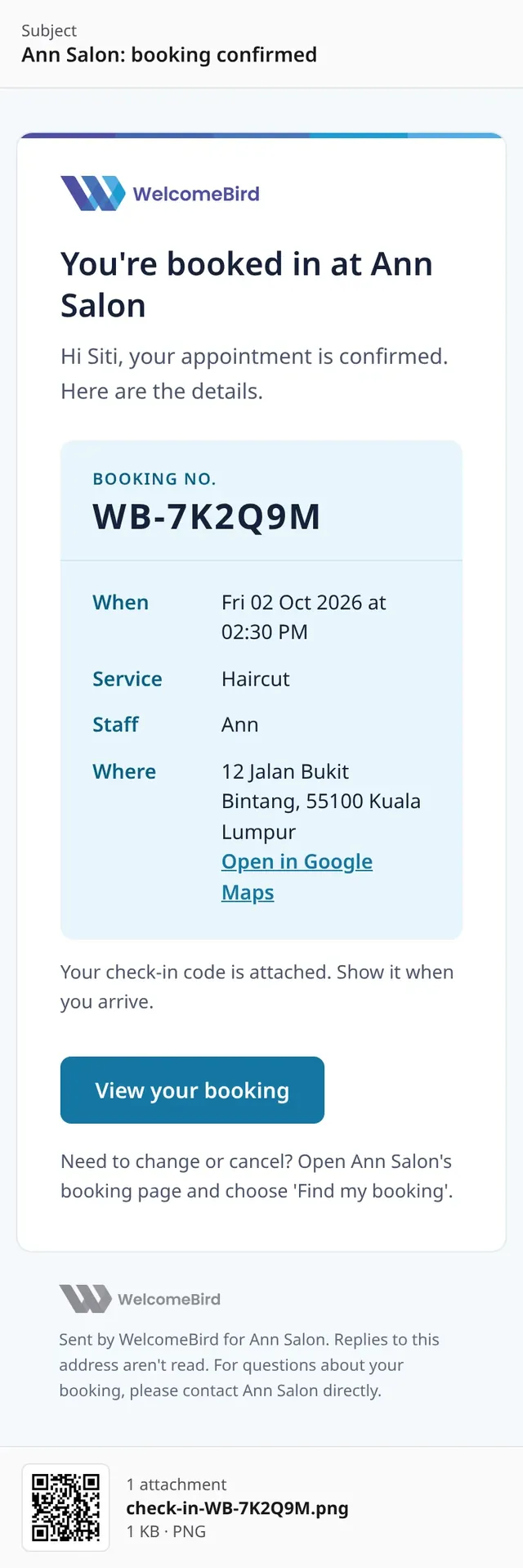
WelcomeBird sends your customers their messages for you. Each message goes by WhatsApp first. If WhatsApp can’t reach the customer or stays silent for 10 minutes, an SMS goes instead. Customers who gave an email also get an email.
Which messages
| When | WhatsApp or SMS | |
|---|---|---|
| A booking is confirmed | Yes | Yes, with the check-in code attached |
| A request is received | Yes | Yes |
| The customer asks to move a booking | No | Yes |
| A request is declined | No | Yes |
| A request is not answered in time | No | Yes |
| You move a booking, or approve a move | Yes | Yes |
| A move is not approved | Yes | Yes |
| You cancel a booking | Yes | Yes |
| The customer cancels | No | Yes |
| Reminder, 24 hours before | Yes | Yes |
| Reminder, 2 hours before | Yes | No |
| Rating ask, after Done, when you turn it on | WhatsApp only, no SMS | Only when WhatsApp can’t reach them |
Customers get no message when you mark a booking arrived, done or no-show, or when you start it early.
Reminders at night
Reminders don’t go out between 9:00 PM and 8:00 AM, your business’s time. A reminder due then is sent at 9:00 PM the evening before.
The rating ask
If you turned on the rating ask, the customer gets a message asking them to rate the visit after you mark the booking Done. It goes by WhatsApp, or by email when WhatsApp can’t reach them.
More about the rating ask
It goes 2 hours after Done by default. You choose the time, from 1 hour to 24 hours. It doesn’t go between 9:00 PM and 9:00 AM: one due then waits until 9:00 AM. It is off to start. Ratings are part of Pro and Business. See Reviews and come-back.
What every message has
- Your business name, the service, who does it (or the court, or the party size for a table), the date and time and the booking number.
- On WhatsApp and email, your address with Open in Google Maps, when your booking page shows one.
- On WhatsApp and email, a Manage booking or View your booking button.
Text messages never carry a link, by Malaysian rules. Each SMS tells the customer to open your booking page and choose Find my booking.
Table bookings
For a table, customers’ messages say Table for 4. They never name the table, so you can move a party to another table without telling them.
Your own messages, the app notification and the owner email, name the table too: Table for 4, T3.
A walk-in gets no message at all: no confirmation and no reminder.
If you change a party’s size, any message not yet sent says the new size. A message already sent stays as it was.
Replies
Customers can’t reply to the messages. They contact you with the phone, WhatsApp or email on your booking page.
Why customers can’t reply
The messages come from WelcomeBird, not from your own number. That number doesn’t receive replies. Customers contact you directly, with the phone, WhatsApp or email on your booking page.
Owner emails
The business’s email gets an email when:
- a booking request comes in: approve or decline it in the app before it lapses;
- a customer asks to move a booking;
- a customer cancels.
Settings
Who can do this: Owner
Every business starts with WhatsApp and SMS on, email on, the person’s name and your address in messages, and the two reminders above. Change them on the web dashboard, under Customer messages.
Change the message settings
Change them on the web dashboard: open Customer messages under Settings. A change saves at once and says Saved. The same screen comes to the app later.
- Send reminders by WhatsApp: WhatsApp first, SMS if WhatsApp can’t reach them. This covers booking confirmations, changes and reminders, not only reminders. Switching it off asks first: Turn off WhatsApp and SMS? Customers then only get emails until you turn it back on. Tap Turn off, or Keep it on.
- Reminders lists when reminders go, such as 1 day before. A reminder at a time WhatsApp has no message for says This one goes by SMS, not WhatsApp.
- What messages show: Name the staff member, Show your address and a map link, and Tell customers we got their request, for bookings that need your OK.
Under it, Customer messages shows how many message credits you used this month, such as 120 of 300 message credits this month, and any extra credits, with See plans. When they run out, WhatsApp and SMS messages stop until next month, and reminders go by email to customers who gave one. See Message credits.